
AgileBits / Wikimedia Commons (Public domain)
Top 10 Best Password Managers 2026
The best password managers of 2026 keep every login behind one strong master password, generate unique credentials for each site, and sync them across your phone, laptop, and browser. This list compares the 10 most trusted options — from open-source favorites to built-in OS vaults — so you can pick the one that fits how you actually log in. Vote for the password manager you trust most, and tell us in the comments which one deserves the top spot.
Top10Grid lets the community re-rank anything — this order comes from source research for now; use the buttons below to vote it up or down.

Current Rankings
- 0

1Password sets the gold standard for password management with its intuitive UI and unique Travel Mode, which instantly removes sensitive vaults when crossing borders. Watchtower breach alerts monitor over 10 billion credentials to warn you of compromised passwords.
- 0

Bitwarden remains the top open-source password manager, offering a feature-rich free tier with unlimited device sync. Its self-hosting option gives privacy advocates full data control, and transparent third-party audits, including a 2023 Cure53 report, verify its security. It is the choice for users who prioritize openness over the curated experience of 1Password.
- 0
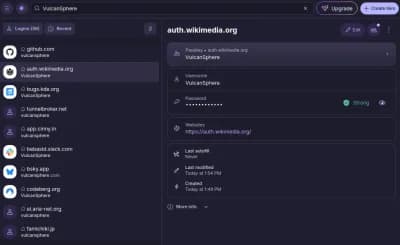
Proton Pass is the password manager in Proton's suite, so it shares an account with Proton Mail, Drive and VPN and falls under the same Swiss jurisdiction. Its distinguishing feature is hide-my-email aliases: a throwaway address generated per site that forwards to your real inbox and can be switched off if that site leaks or sells it. The free tier caps how many aliases you can create; unlimited aliases are a paid feature.
- 0

Apple's Passwords app, split out of Settings in iOS 18 and macOS Sequoia, stores passwords, passkeys, verification codes and Wi-Fi credentials and syncs them through iCloud Keychain with no separate account to create. It is free and unlocks with Face ID or Touch ID, but outside Apple's own platforms it reaches only as far as a Chrome extension on Windows.
- 0#5

Dashlane is a subscription password manager built on zero-knowledge encryption, so the vault is only ever decrypted on the user's own device. Paid plans bundle dark web monitoring that watches for the user's credentials in breach dumps, and the product has pushed early and hard on passkeys as a replacement for passwords.
- 0

KeePassXC keeps the password database as an encrypted file on your own disk, with no server and no account, which removes the vendor-breach risk a cloud manager carries and puts backup and sync entirely on you. It is a community fork of KeePassX, open source, and reads the same KDBX format as the original KeePass, so a database moves between the implementations.
- 0#7

NordPass comes from Nord Security, the company behind NordVPN, and is one of the few managers built on XChaCha20 rather than AES-256, with a zero-knowledge design so the vault is decrypted only on your own device. It includes a data breach scanner and password health checks; the free tier works on one device at a time, which is the usual reason people upgrade.
- 0#8
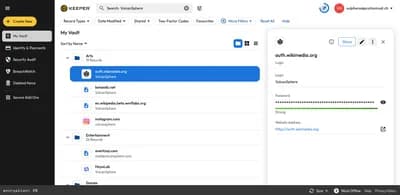
Keeper is a password manager built around a zero-knowledge vault, with a business tier aimed at IT administrators: enforced role-based policies, SSO integration, shared team folders and an event log of vault access. It also sells adjacent secrets-management and privileged-access products, which is what tends to put it on enterprise shortlists rather than consumer ones.
- 0#9

Enpass is built around a one-time purchase rather than a subscription, and it runs no sync server of its own: the encrypted vault sits in cloud storage you already control - Google Drive, iCloud, Dropbox, WebDAV or just a local folder - so the vendor never holds it. The trade-off is that you set up and maintain that sync yourself.
- 0#10

RoboForm has been around since 1999 and is built around form-filling: it stores identities and completes long web forms in one click, alongside ordinary password storage. Its family plan covers five users for about $48 a year. The no-frills interface prioritizes function over flash.
Password manager questions, answered
### Are free password managers safe to use? Yes — reputable free options like Bitwarden and KeePassXC use the same zero-knowledge encryption as paid plans. The trade-off is usually sync conveniences, family sharing, or built-in dark-web monitoring rather than core security.
### Do I still need a password manager if my phone or browser saves passwords? Built-in tools like Apple Passwords and browser keychains have improved a lot, but a dedicated password manager works across every browser and device, generates stronger unique passwords, and warns you about reused or leaked credentials in one place.
### What is a zero-knowledge password manager? A zero-knowledge service encrypts your vault on your device before it ever reaches the company's servers, so even the provider cannot read your stored logins. 1Password, Bitwarden, Proton Pass, Dashlane, Keeper, and NordPass on this list all advertise zero-knowledge architecture.
### Which password manager works offline? KeePassXC stores an encrypted vault file on your own disk and can run fully offline by design. Most cloud-based managers offer an offline mode for viewing saved logins, but sync requires a connection.
Password Manager FAQs
What is a password manager? A password manager stores your logins behind one master password and generates strong, unique passwords for each site.
Are password managers safe to use? The options listed here use zero-knowledge or local encryption, meaning the provider cannot read your stored passwords.
Should I use the password manager built into my phone or computer? Built-in vaults (such as Apple Passwords) are convenient. A dedicated manager typically adds cross-platform sync, sharing, and stronger recovery options.
Which password manager is best for beginners? Look for one with simple setup, browser extensions for the browsers you use, and clear import tools.
Image credits
- 1Password: 1Password / Wikipedia
- Bitwarden: Bitwarden / Wikipedia
- Proton Pass: Proton Pass / Wikipedia
- Apple Passwords (iOS/macOS): Passwords (Apple) / Wikipedia
- Dashlane: Aadenje / Wikimedia Commons (CC BY-SA 4.0)
- KeePassXC: KeePassXC / Wikipedia
- NordPass: Nordpass.png / Wikimedia Commons
- Keeper: Software: Keeper Security, Inc. Screenshot: VulcanSphere / Wikimedia Commons (CC BY-SA 4.0)
- Enpass: Rosmarie Voegtli / flickr (BY)
- RoboForm: U.S. Navy photo by Mass Communication Specialist 3rd Class Joshua Martin / Wikimedia Commons (Public domain)
Related Videos
Rank it your way
Remix this list into your own ranking, or head to the play hub for every game mode and community breakdown — blind mode, challenges, tier lists, and more.
You Might Also Like

Top 10 Password Managers in 2026
Top 10 Password Managers in 2026

Top 10 Best Cybersecurity and Privacy Tools of 2025
Top 10 Best Password Managers 2026

Top 10 Productivity Apps That Actually Changed How People Work
Top 10 Productivity Apps That Actually Changed How People...
Top 10 Hacker News — Top Stories — September 7, 2026
#1 Keep Our Servers Running · #2 Making a Python interpreter in 1024 bytes · #3 Ask HN: Fable hacked my piano, can I release the results?
Top 10 Hacker News Stories (August 5, 2026): Mistral Shieldstral, Skin-Tone Algorithm & More
#1 Stateless MCP has recaptured my interest · #2 "Gravity is worth asking about." · #3 The Golden Age of British Ice Cream

Hacker News Top 10 for March 18, 2026: Pike's 1989 Rules, Turing Award & AI Coding Debate
#1 Rob Pike's Rules of Programming (1989) · #2 OpenRocket · #3 Show HN: Hacker News archive (47M+ items, 11.6GB) as Parquet, updated every 5m