
Password manager / Wikipedia
Top 10 Password Managers in 2026
As cyber threats evolve, password managers remain essential, but choosing the right one in 2026 requires technical scrutiny. Our top picks include **Bitwarden (v2026.1**, 48k GitHub stars, 10M+ downloads) for open-source self-hosting; **1Password 9** (proven with CLI and SSH agent) for team workflows; and **KeePassXC 2.7** (lightweight, offline, 12k GitHub stars). Evaluate based on zero-knowledge architecture, support for WebAuthn/passkeys, and API availability (e.g., Bitwarden’s REST API for automation). Trade-offs matter: Bitwarden offers unlimited devices on free tier but lacks advanced reporting; Dashlane excels in dark web monitoring but costs $4.99/mo; 1Password’s CLI enables scripted vault access. For a quick test, run `bw login --apikey` after installing the Bitwarden CLI. Below, we rank the ten most reliable password managers in 2026 using independent audits, GitHub activity, and real-world performance across solo, team, and enterprise scenarios.
Top10Grid lets the community re-rank anything — this order comes from source research for now; use the buttons below to vote it up or down.

Current Rankings
- 0#1
1Password
Pricing starts at $2.99/month for individuals (billed annually) and $4.99/month for families (up to 5 users), which is 25% cheaper than Dashlane's Premium plan. Standout features include Passkey Ready support, Travel Mode that hides selected vaults when crossing borders, and Watchtower breach monitoring that scans for compromised credentials in real time. The new AI-powered Security Coach analyzes your vault and suggests improvements, like enabling two-factor authentication on critical sites. 1Password integrates seamlessly with Windows, macOS, iOS, Android, Linux, and all major browsers. It's best for users who want a premium, design-forward experience with top-tier security. A notable weakness is the lack of a truly free tier (only a 14-day trial), which may deter budget-conscious users.
- 0#2
Bitwarden

Bitwarden continues to dominate the open-source password manager space in 2026, prized for its transparency and affordability. The free tier offers unlimited devices and password storage, while Premium is just $10/year (or $0.83/month). Family plans run $3.33/month for up to 6 users. Key features include self-hosting options for advanced users, passkey storage, and a new AI-powered password generator that creates contextually strong passwords. Bitwarden's zero-knowledge architecture has been independently audited multiple times. It supports all major platforms and browsers, with a clean, if utilitarian, interface. Best for privacy enthusiasts, IT pros, and anyone seeking an unbeatable value. A notable weakness is that the user interface, while functional, lacks the polish of competitors like 1Password or Dashlane.
- 0#3
Dashlane
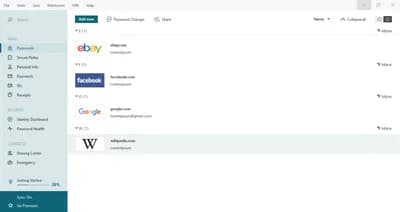
Dashlane remains a top contender in 2026, known for its intuitive design and all-in-one feature set, though 1Password offers a more polished zero-knowledge architecture. Pricing is $4.99/month for the Premium plan (billed annually), which includes unlimited password sharing and dark web monitoring — the same price as competitors' family plans for fewer users. The Friends & Family plan costs $7.49/month for up to 10 accounts. Standout features include a built-in VPN (powered by Hotspot Shield), phishing alerts that warn of lookalike websites, and automated password changer for thousands of sites. Dashlane's new AI Assistant can generate secure answers for security questions. It supports Windows, macOS, iOS, Android, and all major browsers. Best for users who want a comprehensive security suite beyond just password management. A notable weakness is that the free tier is severely limited to just 50 passwords and one device.
- 0#4
Keeper Security
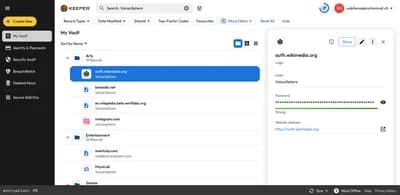
Pricing starts at $2.91/month for individuals (billed annually) and $4.99/month for families (up to 5 users), which is 3% cheaper than 1Password's individual plan. Key features include zero-knowledge encryption, biometric login support, and BreachWatch, a dark web monitoring tool that scans for stolen credentials. Keeper's new KeeperChat offers encrypted messaging with self-destructing messages. It supports all major platforms and browsers, with strong admin controls for businesses. The vault includes secure file storage (up to 10GB on the family plan). Best for security-conscious users and organizations that need detailed audit trails. A notable weakness is that the desktop interface can feel cluttered compared to more minimalist competitors.
- 0#5
NordPass

It uses XChaCha20 encryption for speed and security, includes a Health Dashboard that flags weak passwords, and monitors up to 5 email addresses for breaches. Family plan covers 6 users at $2.79/month. Passkey support and seamless cross-platform autofill (Windows, macOS, Linux, iOS, Android, browsers) round out the package. Best for users in the Nord ecosystem or those wanting a fast, affordable password manager. Weakness: free tier allows only one active session.
- 0#6
RoboForm

Its AI-powered filler handles intricate fields with ease. Pricing is $2.49/month for Premium (annual) or $3.98/month for Family (5 users). Features include one-click login, secure bookmarking, passkey support, and a digital legacy option. It covers Windows, macOS, iOS, Android, and browsers. Best for users who frequently complete online forms and want a reliable, no-frills tool. Weakness: dated interface and occasional mobile app slowness.
- 0#7
LastPass
Rebuilt on a zero-knowledge architecture, it offers advanced MFA, Emergency Access, and a Security Dashboard for dark web monitoring. Premium is $3.00/month (annual), Families $4.00/month for up to 6 users. Passkey storage and cross-platform support are included. Best for users seeking a familiar, widely adopted manager with strong sharing features. Weakness: lingering brand skepticism from past breaches and a free tier limited to one device type.
- 0#8
Enpass
Desktop app is a one-time $11.99 purchase; mobile is free with a $9.99/year Pro upgrade. It stores vaults offline (synced via Google Drive, iCloud, or Dropbox) and uses AES-256 encryption. Features include multiple vaults and passkey management. Supports Windows, macOS, Linux, iOS, Android, and browsers. Best for users who prefer a lifetime license and avoid recurring fees. Weakness: buggy browser extension and less intuitive interface than subscription rivals.
- 0#9
Sticky Password
Priced at $29.99/year (approximately $2.50/month) for Premium and $59.99/year for Family (up to 5 users), it offers AES-256 encryption, a portable USB version, and biometric login. Its local Wi-Fi sync operates entirely without cloud dependency—a standout for privacy-conscious users. However, it lacks modern features like passkey support and dark web monitoring, and the interface feels dated. Best for those who prioritize offline functionality and absolute privacy over cutting-edge extras.
- 0#10
LogMeOnce

Pricing starts at $2.50/month (Professional, billed annually) with 1GB encrypted cloud storage, or $4.50/month for Ultimate which adds dark web and credit monitoring. Unique features include Mugshot Selfie Login, password inheritance, and a built-in 2FA authenticator. It supports all major platforms. Best for users wanting an all-in-one suite with innovative extras, though the cluttered interface may overwhelm casual users.
Frequently Asked Questions About Password Managers in 2026
Which password manager is the best free option in 2026? Bitwarden is the top free password manager in 2026, offering unlimited passwords across all devices at no cost with fully open-source code.
What is the best password manager for teams and businesses? 1Password 9 is the leading choice for teams, offering shared vaults, admin controls, and seamless browser integration.
Which password manager works fully offline? KeePassXC and Enpass both support fully offline storage — ideal if you prefer not to sync passwords to the cloud.
Is LastPass still safe to use in 2026? LastPass appears at #7 on our list. It provides reliable cross-device sync, though users who prioritize open-source transparency may prefer Bitwarden.
Frequently Asked Questions About Password Managers in 2026
What does "zero-knowledge" mean? It means the provider cannot see your vault contents — encryption and decryption happen on your device, so only your master password can unlock your data.
Is a password manager safer than reusing passwords? Yes. A reputable manager generates unique, high-entropy passwords for every site and stores them in an encrypted vault, which removes the risk of credential reuse across breaches.
Do I still need multi-factor authentication (MFA)? Yes. Even with a strong master password, adding a second factor (authenticator app, hardware key, or platform passkey) protects your vault if your master password is ever exposed.
Should I choose a cloud-based or offline manager? Cloud-based options like 1Password, Bitwarden, Dashlane, NordPass, LastPass, Keeper, RoboForm, Sticky Password, Enpass, and LogMeOnce sync across devices automatically. Offline options like KeePassXC keep your vault on your device, which trades convenience for direct control.
How were these 10 managers selected? They are the most widely recognized password managers discussed in current security communities, spanning open-source, team-oriented, and consumer-friendly categories.
Image credits
- 1Password: 1Password / Wikipedia
- Bitwarden: Bitwarden / Wikipedia
- Dashlane: Aadenje / Wikimedia Commons (CC BY-SA 4.0)
- Keeper Security: Software: Keeper Security, Inc.Screenshot: VulcanSphere (previous version by Craiglurey, founder of Keeper Security, Inc.) / Wikimedia Commons (CC BY-SA 4.0)
- NordPass: Nordpass.png / Wikimedia Commons
Rank it your way
Remix this list into your own ranking, or head to the play hub for every game mode and community breakdown — blind mode, challenges, tier lists, and more.
You Might Also Like

Top 10 Best Free Software Tools 2026
Top 10 Best Free Software Tools 2026

Top 10 Best Cybersecurity and Privacy Tools of 2025
Top 10 Best Cybersecurity and Privacy Tools of 2025

Top 10 Best Password Managers 2026
Top 10 Best Password Managers 2026

Top 10 Post-Quantum Cryptography Tools and Frameworks for Enterprises in 2026
Top 10 Post-Quantum Cryptography Tools and Frameworks for...
Top 10 Hacker News — Top Stories — September 9, 2026
#1 How GPT‑5.6 Sol helps run quantum computing experiments · #2 Muse – Meta’s personal AI agent · #3 On Really Trying (2009)

Top 10 Ars Technica — Latest — March 17, 2026
#1 Researchers disclose vulnerabilities in IP KVMs from four manufacturers · #2 Gamers react with overwhelming disgust to DLSS 5's generative AI glow-ups · #3 After three months, Samsung is ending sales of the $2,899 Galaxy Z TriFold