
Pexels
Top 10 Free Productivity Apps to Use in 2026
Stay productive in 2026 without spending a cent. We've ranked the best free apps for task management, note-taking, and team collaboration. Be the first to vote for your favorite and share your picks below!
Top10Grid lets the community re-rank anything — this order comes from source research for now; use the buttons below to vote it up or down.

Current Rankings
- 0#1

Notion's pitch is one app that replaces ten: notes, docs, databases, and project boards, all linked and searchable. That flexibility is the whole appeal, and it holds up right until a database grows large, at which point pages can start taking noticeably longer to load. Small, technically comfortable teams who like building their own systems get the most from it; if you just want a task list that works on day one, look elsewhere on this page.
- 0#2

Todoist does one thing and does it well: capture a task in seconds, and it syncs everywhere instantly. That focus is also its limit — the free plan tops out at five active projects and offers no task dependencies, so anything beyond a personal or small-team to-do list needs an upgrade. Individuals and small teams running straightforward, linear lists will never notice the ceiling; anyone managing a real project will hit it fast.
- 0#3
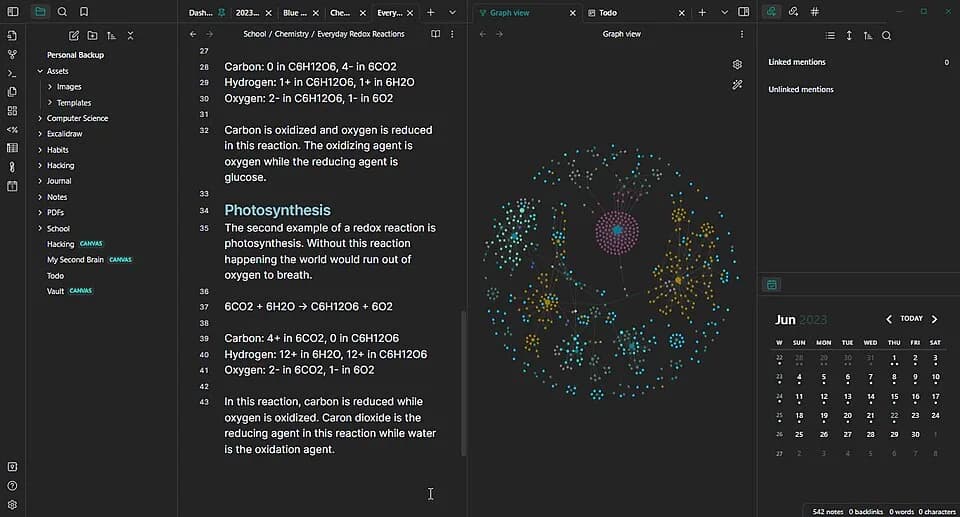
Your notes live as plain Markdown files on your own disk, not in someone else's cloud — which means Obsidian is arguably the only app here you could still open in twenty years regardless of what happens to the company. The graph view linking notes together is genuinely useful once it clicks, but the setup isn't trivial: new users often say it takes a while to feel natural. Worth the investment if you're building a long-term personal knowledge base solo.
- 0#4
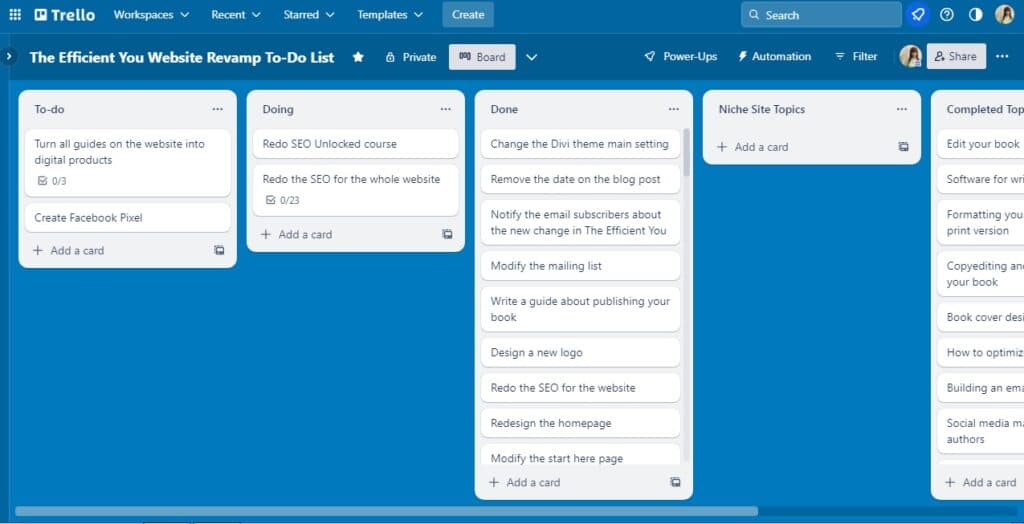
Trello's Kanban board is the format everyone already understands — drag a card, it's done — and the free plan is unusually generous for what it is. The catch shows up the moment a project needs more structure than columns: no Gantt view, no dependencies, nothing that tracks how one task blocks another. Fine, even ideal, for small teams running simple workflows; a poor fit the moment a project gets genuinely complex.
- 0#5

Built by and for engineering teams, and it shows: Linear is fast in a way most productivity software just isn't, with keyboard-first navigation that rewards using it daily. That same focus makes it overkill anywhere outside software development — a marketing team asked to adopt it will mostly wonder where the calendar view went. Best fit is exactly what it was built for: startups and software teams already living in GitHub.
- 0#6

ClickUp's answer to 'can it do X' is almost always yes — it packs in more views, fields, and automations than anything else on this list, which is presumably why it holds a 4.7-out-of-5 rating. The tradeoff is the same density: new users can spend their first session lost in settings before creating a single task. Power users and agencies who'll actually use the depth get the most out of it; everyone else may want to start somewhere simpler.
- 0
If you're already living in Gmail, the free trinity of Gmail, Drive, and Docs is hard to beat, and 15GB of storage covers most individual use without paying anything. The gaps show up offline — functionality drops noticeably without a connection — and Google has a track record of quietly retiring features users relied on. Best for individuals, classrooms, and teams already inside the Google ecosystem; nobody's switching in just for this.
- 0#8
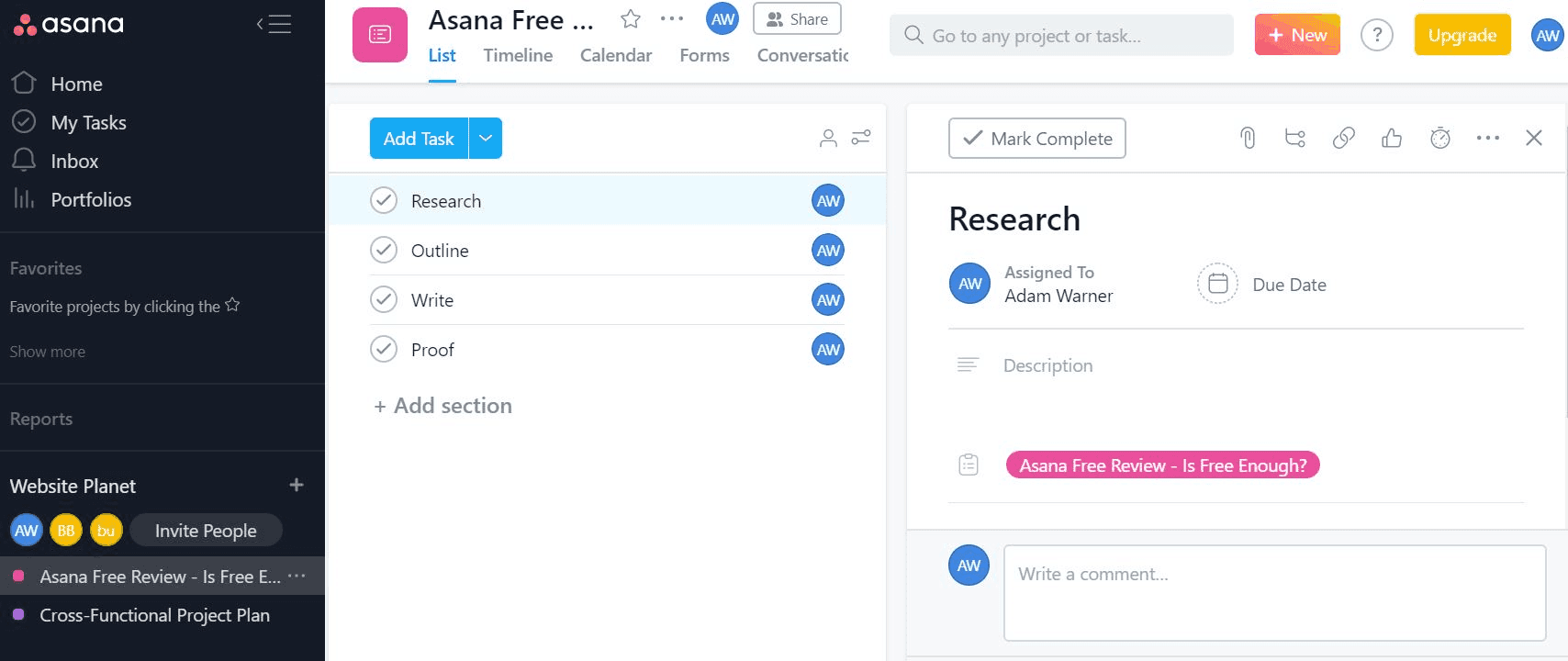
Asana's real strength is that it offers list, board, timeline, and portfolio views of the same work, so different people on a team can look at it the way that makes sense to them. That flexibility has a price, literally — timeline views sit behind the Premium tier, so the free plan shows you what you're missing more than it lets you use it. Makes sense for mid-size teams with a budget already earmarked; less so for anyone hoping to stay free forever.
- 0#9

Logseq is open source and stores everything locally, so your notes are yours in a way that survives the company folding, being acquired, or changing its pricing overnight — a real answer for anyone burned by vendor lock-in before. The graph view is genuinely elegant once populated. What you give up is polish: updates have been known to break existing setups, and it shows the rough edges of a project built by volunteers rather than a product team.
- 0
OneNote's strongest feature is one most competitors ignore: excellent stylus and ink support, plus a free-form canvas that behaves like an actual notebook rather than a linear document. The interface will feel instantly familiar to anyone who's used Word. Where it falls down is navigation — sections and pages get messy fast, and finding an old note later takes longer than it should. Best suited to stylus users and anyone already inside the Microsoft ecosystem.
How to Actually Choose One of These
The honest way to pick from this list is to start with how you already think, not with a feature checklist — every tool here is competent, so the differentiator is fit. If you default to writing linear to-do lists and want them to disappear once done, a capture-first tool like Todoist beats a workspace tool that makes you build a system before it's useful. If your problem is that information is scattered across five apps, an all-in-one workspace like Notion earns its learning curve. If you specifically distrust cloud lock-in — you want your notes to still open in twenty years, in a plain folder, with no company able to shut them off — that requirement rules out most of this list and points you straight at Obsidian or Logseq, which store everything as local Markdown files.
Team size matters more than most buying guides admit. A solo user and a 40-person team hit completely different walls in the same free tier. Trello and Todoist are genuinely pleasant for one person or a small team doing straightforward lists; they get uncomfortable fast once a project needs dependencies, timelines, or approvals, which is exactly where Asana and ClickUp are built to hold up — at the cost of a steeper setup.
The Real Cost of "Free"
None of these apps are free without limits — they're free until a specific, predictable wall. Todoist caps free accounts at five active projects. Trello's free plan works fine until a board needs Gantt-style timelines or cross-board dependencies, which it can't do at all. Asana reserves timeline view for paid plans, so the feature that makes it worth choosing over a simpler list app is the first thing you lose. Knowing where your specific workflow will hit that wall before you invest weeks of notes and tasks into a tool saves a painful migration later.
The two outliers are Obsidian and Logseq, whose free tier isn't really a tier at all — the core app has no artificial cap because your data is just files on your own disk. The trade-off shows up as friction instead of a paywall: less polish, a rougher first-hour setup, and no customer support team to call when a plugin breaks something.
Image credits
- Notion: Notion-logo.svg / Wikimedia Commons
- Todoist: Unknown authorUnknown author / Wikimedia Commons (Public domain)
- Obsidian: Langstonzac25 / CC BY-SA 4.0 (entity-adopted)
- Trello: Bing Images / www.theefficientyou.com
- Linear: Lambtron / Wikimedia Commons (CC BY-SA 4.0)
- ClickUp: Bing Images / platinumpartner.com.au
- Google Workspace: Google / Public domain (entity-adopted)
- Asana: Bing Images / dt2sdf0db8zob.cloudfront.net
- Logseq: AlexRosenthal / CC0 (entity-adopted)
- Microsoft OneNote: Microsoft OneNote Icon (2025 - present).svg / Wikimedia Commons (entity-adopted)
Related Videos
Rank it your way
Remix this list into your own ranking, or head to the play hub for every game mode and community breakdown — blind mode, challenges, tier lists, and more.
You Might Also Like

Top 10 AI Companies Dominating the World in 2026 — And What They're Really Building
Top 10 AI Companies Dominating the World in 2026 — And Wh...

Top 10 US SaaS Unicorns 2026
Top 10 US SaaS Unicorns 2026

Top 10 Most Powerful AI Companies 2026
Top 10 Most Powerful AI Companies 2026

Top 10 European HealthTech Companies 2026
#1 Doctolib · #2 Alan · #3 Kry / Livi

The World's Tallest Buildings
#1 Burj Khalifa · #2 Merdeka 118 · #3 Shanghai Tower

Top 10 German Technology Companies 2026
#1 SAP · #2 Siemens · #3 Bosch